
Sling: Employee Scheduling App
Sling Inc.Communication
4.22.28K Reviews
- Version
- 1.90.84
- Installs
- 1.00M
- Age Rating
- Everyone
Screenshots
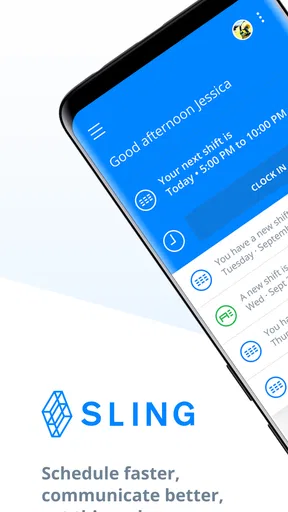
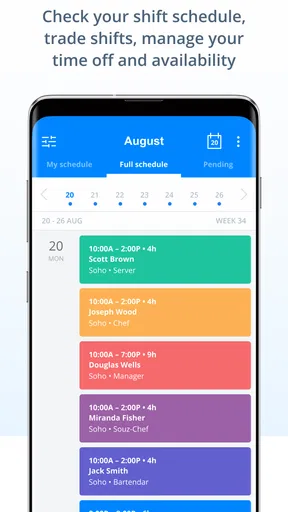
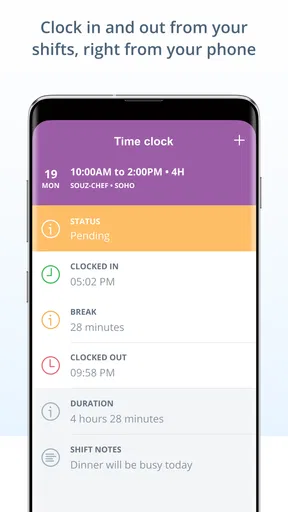

Our Review of Sling: Employee Scheduling App
 Analysis by Appyee
When a workplace still builds schedules in spreadsheets, group chats, or a whiteboard, the hardest part is rarely creating the first version. The real problem begins when someone calls in sick, swaps a shift, or needs to know where they are expected to work. I tested Sling as a communication app focused on employee scheduling, and its strongest idea is simple: put the schedule where the people affected by it can see and discuss it.
That focus makes it different from a general chat app. Sling is made by Sling Inc. and is free, with an Everyone content rating, so it is approachable for mixed-age teams and small businesses that want to avoid adding another paid system immediately. It belongs in the communication category, but I found its value most clearly in the connection between a published shift and the conversations around that shift.
The app has been available since January 7, 2015, and its current version is 1.90.84 for devices running iOS 9 or later. Its average score is 4.2 from around 10 thousand ratings, while the app has passed one million installs. Those figures suggest that it has reached a substantial audience, but they do not replace the more important question: does it make a particular team’s daily scheduling less chaotic?
Why the shared schedule matters more than another chat channel
The capability I kept coming back to was the shared view of work shifts. A schedule is not just a list of names and times; it is a reference point for the whole team. When that reference lives in a dedicated app, an employee can check the current plan instead of searching through old messages or asking a manager to resend a screenshot.
That sounds ordinary until the schedule changes several times during a busy week. In a normal messaging app, a correction can disappear beneath unrelated conversation. A spreadsheet may show the latest version, but only if everybody knows where it is and remembers to open it. Sling’s scheduling-centered approach gives the team a more natural place to look first.
I also like the distinction between information and conversation. The schedule answers “when am I working?” while the communication side can handle the practical follow-up: a question about a shift, a request to coordinate with colleagues, or a notice that a change needs attention. Keeping those activities close together reduces the number of places employees have to monitor.
The real benefit is fewer versions of the truth. That is more useful than a long list of communication tools. A scheduling app earns its place when employees trust that the displayed plan is the one their manager expects them to follow.
What using it feels like for an employee
From an employee’s point of view, the first useful habit is checking Sling before starting the day or planning the week. Instead of relying on memory, I would use the schedule as the starting point for deciding when I can make personal plans. That small change matters in retail, hospitality, care work, and other jobs where working hours may not follow a fixed office routine.
The interface is most valuable when a person needs context around a shift. A bare calendar entry can tell me the time, but workplace schedules often require interpretation: which location or team is involved, whether the shift has changed, and whether I need to respond to a request. Sling’s communication purpose makes that context more relevant than it would be in a basic calendar.
For managers, the workflow begins from the opposite direction. They create or maintain the schedule, then use it as the shared point of reference for employees. The important discipline is to update the schedule itself rather than announcing every change in a separate message. If a manager posts “tomorrow is different” in chat but leaves the schedule untouched, the app cannot solve the underlying confusion.
That is one of my practical tips: treat the published schedule as the authoritative record, and use messages to explain changes rather than replace them. Employees then learn one reliable routine—check the schedule first, read the related communication second.
A realistic shift-change example
Imagine a café where an employee becomes unavailable for an upcoming shift. In a group chat, the manager might ask whether someone can cover it, receive several replies, and later forget to update the original schedule. One employee may remember the conversation, another may only see the old roster, and the manager has to reconstruct the final decision.
With Sling as the team’s scheduling hub, the useful workflow is more orderly. The manager can communicate the problem to the relevant people, coordinate the change, and make sure the final arrangement is reflected in the schedule. The employee who takes the shift has a clearer reason to return to the app, while the person who is no longer working it has a better chance of seeing the updated plan.
The app does not remove the need for a manager to make a decision. It does not turn an informal agreement into a confirmed schedule by magic. Its contribution is reducing the gap between the conversation and the record. That is a meaningful improvement in workplaces where last-minute changes are common.
Another useful scenario is a team with several supervisors. If each supervisor communicates through a different personal channel, employees can receive inconsistent instructions. A shared scheduling app gives the organization a common location for the plan, even though the quality of the result still depends on managers keeping it current.
Where it compares well with familiar alternatives
Compared with a general chat app, Sling is more purposeful for shift-based work. Chat tools are excellent for quick conversation, but they are not automatically good at preserving a clean schedule. A message thread can become noisy, and a pinned post may still be missed when the timetable changes. Sling’s advantage is that the schedule is the main object rather than an attachment or side note.
Compared with a shared spreadsheet, the app is easier to approach from a mobile-first employee perspective. A spreadsheet can be flexible, especially for an experienced administrator, but it often depends on careful formatting and manual discipline. Sling is a better fit when the goal is for ordinary staff members to check the plan without understanding how the underlying document was built.
Compared with a paper roster, the digital schedule is more practical for distributed teams and for changes that happen after people have left the workplace. Paper still has one strength: it is visible without a device or connection. A business that depends on a physical board for compliance, handover, or quick visual scanning may want to keep that backup even if it adopts Sling.
Compared with a full workforce-management platform, Sling may feel more focused and less intimidating for a smaller operation. A large organization with complex payroll, attendance, forecasting, or human-resources requirements may prefer a broader system. I would not choose this app solely because it is free if the business actually needs deep administrative controls elsewhere.
The tradeoffs I noticed before recommending it
The first limitation is behavioral, not technical: every person has to adopt the same routine. If half the team checks Sling while the other half depends on text messages, the workplace ends up with two communication systems. That can be worse than one imperfect system because employees are unsure which source deserves priority.
The second tradeoff is that a scheduling app can expose poor scheduling habits. If shifts are frequently changed without clear explanations, Sling makes the activity more visible, but visibility is not the same as fairness or stability. Employees may still feel frustrated by unpredictable work. The app organizes information; it does not fix management decisions.
I would also be careful about using it as a substitute for every workplace conversation. A shift schedule is a good place for operational coordination, but sensitive personnel matters, detailed performance discussions, and anything requiring formal company procedures should remain in the appropriate channel. Keeping scheduling communication focused helps prevent the app from becoming a cluttered replacement for all internal communication.
There is also a learning curve for managers who move from a casual group chat. They need to establish rules: when a shift is considered final, who is allowed to change it, how employees should acknowledge an update, and what to do if they cannot access the current schedule. Without those rules, the app may simply make an old process look more modern.
My advice is to introduce it with one clear policy: if a change affects working time, the schedule must be updated, and the message should point people back to that update. That single rule prevents the most common failure of digital scheduling—an announcement that never becomes part of the official roster.
Small-team workflows that make the app more useful
For a small business, I would start with one department or location rather than moving every employee into the app at once. This gives managers a chance to test how they publish shifts, handle changes, and communicate urgent issues. It also reveals whether employees naturally check the schedule or need a reminder during the first few weeks.
A second practical workflow is to separate planning from exceptions. The regular schedule should remain easy to scan, while unusual events—coverage problems, questions, or last-minute adjustments—should be discussed around the relevant work. This keeps the schedule from becoming a diary of every minor conversation.
A third insight is to use the app to improve handoffs between supervisors. If one manager finishes a shift and another takes over, the shared schedule provides continuity. The incoming supervisor can see the current staffing plan instead of relying entirely on a verbal explanation. That is especially helpful when several people share responsibility for the same team.
For employees, I would recommend checking the app at consistent moments rather than constantly watching notifications. A morning check, a review before the next workday, and a quick look after a manager announces a change can create a predictable rhythm. The exact routine will differ by workplace, but the principle is the same: use the app as a dependable reference, not as a source of anxiety.
Who will gain the most from Sling?
This app makes the most sense for teams whose working hours change and whose employees need a shared schedule on their phones. Restaurants, shops, salons, cleaning teams, event crews, and similar workplaces can benefit because their staffing problems are often about coordination rather than long-form project management.
It is also a sensible choice for a small business that wants a dedicated scheduling space without an immediate software expense. Free access lowers the barrier to experimentation, though I would still evaluate whether the app fits the company’s process before making it the only official channel.
Managers gain the most when they are willing to maintain one accurate schedule. Employees gain the most when they are tired of hunting through messages for their next shift. The app is less compelling for a team with fixed hours, a tiny number of workers who already communicate face to face, or an organization that needs advanced administrative functions beyond scheduling communication.
I would also skip it if the workplace cannot agree on ownership. Someone must be responsible for keeping the roster current. If nobody has that role, the app becomes another place where outdated information can sit, and the convenience of a digital schedule disappears.
My recommendation after using the scheduling-first approach
Sling is not impressive because it tries to replace every workplace tool. Its strength is narrower and more practical: it gives a shift-based team a shared place to organize working time and discuss the changes that surround it. In my experience, that focus is exactly what makes it easier to recommend than a generic chat room for scheduling.
The app is free, rated for Everyone, and available from Sling Inc. for older supported devices as well as newer ones, which makes trying it relatively approachable. Still, the important test is not installation. Give it a real scheduling rule, assign responsibility for updates, and see whether employees stop asking the same “when am I working?” question in several different channels.
My final view is positive but conditional. Choose Sling when the main pain is scattered shift information, not when you need an all-purpose business suite. Used consistently, it can turn a fragile chain of messages into a clearer daily routine. Used casually, it will only add another inbox. For the right small or mid-sized shift team, that difference is enough to make the app genuinely worthwhile.
Verdict
Strengths of Sling: Employee Scheduling App
- Quick shift creation and editing from a mobile device.
- Employees can view schedules and availability in one place.
- Useful reminders help reduce missed shifts and appointments.
- Time-off requests can be submitted without extra paperwork.
- Schedule changes are easier to share with the whole team.
Limitations of Sling: Employee Scheduling App
- Some advanced features may require a paid subscription.
- Small teams may not need all of the available tools.
- Notifications can become excessive if settings are not adjusted.
- Employees need reliable internet access for timely updates.
- Initial setup may take time when adding staff and shift rules.
Similar Picks in This Category
View All
Google Messages
Google LLC4.6

Gmail
Google LLC4.1

Google Meet
Google LLC4.4

Google Chrome
Google LLC4.1

WhatsApp Messenger
WhatsApp LLC4.6

Carrier Services
Google LLC4.2
Frequently Asked Questions
What is Sling: Employee Scheduling App used for?
Sling is a workforce management app designed to help businesses create and share employee schedules, organize shifts, and improve workplace communication. After setting up a team, managers can assign shifts, notify employees about changes, and coordinate availability in one place. It is particularly useful for restaurants, retail stores, hospitality teams, healthcare workplaces, and other businesses with rotating or hourly staff.
Can employees view their schedules and request time off in Sling?
Yes. Employees can use Sling to check upcoming shifts, review schedule details, and stay informed when a manager publishes or changes the rota. Depending on the company’s configuration, they may also submit time-off requests, indicate availability, swap shifts, or communicate about coverage. Approval for these actions normally remains with a manager, so available options can vary between workplaces.
Does Sling include messaging and team communication features?
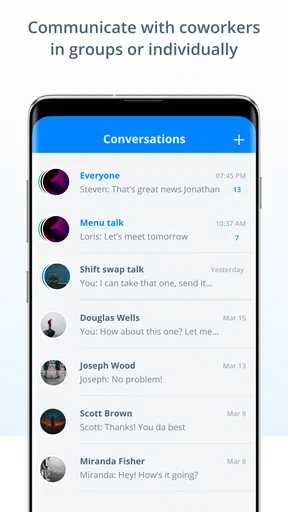
Sling includes communication tools that help managers and employees discuss work without relying entirely on personal messaging apps. Teams can communicate through workplace conversations, group discussions, and shift-related updates, while managers can share announcements with selected employees or the entire organization. These features are useful for clarifying responsibilities, sharing reminders, and keeping schedule changes visible.
Does Sling offer time tracking or employee attendance features?
Sling can support time tracking and attendance management, allowing businesses to record when employees start and finish work and compare worked hours with scheduled shifts. Some organizations may use additional controls or integrations depending on their plan and setup. Employees should check whether their workplace has enabled clock-in, clock-out, break tracking, and related features before relying on the app for payroll information.
Is Sling free to download, and are all features available without payment?
Sling can generally be downloaded at no initial cost, but access to features depends on the plan selected by the business using it. Basic scheduling and communication functions may be available under a free option, while advanced tools, reporting, time tracking, or administrative controls can require a paid subscription. Employees usually do not choose the plan themselves; their employer manages account access and billing.
